
Paid advertisement – not affiliated with this forum

SVENORDIUM
Unique IPTV Experience
🛡️ Anti ISP Block
🎧 Friendly Support 🔴 Live Content 🎬 VOD
⚡ Instant Activation
⚡ Instant Activation
🤝 Reselling Available
▶️ Watch Now
Paid Advertisement – Not Mine
You are using an out of date browser. It may not display this or other websites correctly.
You should upgrade or use an alternative browser.
You should upgrade or use an alternative browser.
Smart IPTV has been removed from most of the OLD Samsung Version
- Thread starter husham
- Start date
Sorry I do it all you process und nothing in my TV
with Usb whene I put it only go in file but nothing open from usb Stick.
In book I see Android Soft but not understand why have no opcion for install any apps
only have Netflix , you tub , twiter, facebook and some apps nothing other ,
maybe need one good soft for do in opensorce I thing
Thanks and Regars!

Offline
ok couple of question for you pleaseSorry I do it all you process und nothing in my TV
with Usb whene I put it only go in file but nothing open from usb Stick.
In book I see Android Soft but not understand why have no opcion for install any apps
only have Netflix , you tub , twiter, facebook and some apps nothing other ,
maybe need one good soft for do in opensorce I thing
Thanks and Regars!
what do you mean in android?
is your TV android?
does it have Google playstore in your TV
Also usually if your Samsung Smart tv doesnt show the app installed or process to install app then try to locate the app in the background installed..
check the apps section
Offline
Click the apps in the tvThis I want to see where to finde locate the app in the background in my TV the Apps
Click see more
Should be able to see it there


Offline
husham do you have a software update for the non automaticaly installation for my tv?
Offline
I'm sorry I don't have a TV like your one to make a video for you.How to browse all apps I not see option for this
any video how to do
Regards!
Your alternative program to install in your tv. Is ssiptv also with usb I made or see if netiptv is there
Offline
What is your tvhusham do you have a software update for the non automaticaly installation for my tv?
Offline
What is your tv
I already wrote... it doesn't install automaticaly, but I can run the app from the USB. Maybe you have a new update for my TV?
My TV:
UE50HU6900
Offline
Depending on your version of Samsung OS. Samsung was so stupid by making up their own Operating system and thought it is the new god of all operating system. Two decades later. They regret not to making this is with apple is which means they still thing they.are thinking for the end user benefits when they are really stupid more then they know it because apple is is same as their own idiotic OS.so is there a possibility that I can install the app and not keep plug in the usb stick?
My TV: UE50HU6900
Ok back to the tv model you gave me. It should work.
Otherwise I might have to upload new software for new models that the software I have missed
[/QUOTE]
do you have an update for my model? my problem is still that I cant install the app, I cant only start the app from the usb direct...
my tv: UE50HU6900
Offline
Your tv does not have storage to storage to allow apps to install. That's the reason you need usb always indo you have an update for my model? my problem is still that I cant install the app, I cant only start the app from the usb direct...
my tv: UE50HU6900

Offline
did you extract the usb file
Yes I have extracted, and I tried dragging and dropping but none of them seem to work. I keep getting the same error notification.
Offline
can you take a screenshoot of the error you getting
Attachments

Offline
can you check the other folders that said OLD in the usb and replace the main folder with one of the old files
So I got a notification saying it's been successfully installed. HOORAY! But I can't find it on my TV? Where or how can I access the app itself?
Offline
congrats first
its probably in the apps section
and can i ask .. how did you get it installed ok
I kept the userwidget file on my USB, and drag and dropped the SmartIPTV folder from one of the old files and clicked "Replace Files"


Offline
hi dear husham .. my friend has a samsung tv UE55JS9000
he tried to put the smartiptv on usb connected to the tv
but nothing happend .
could u please help in this matter
warm regards
he tried to put the smartiptv on usb connected to the tv
but nothing happend .
could u please help in this matter
warm regards
Offline
he didnt see the app on his tv . no errors
Offline
he didnt see the app on his tv . no errorsYes sure. Will need more info on how and what error he is getting
Offline
Hi Husham.
I am not seeing the installation run after I insert the USB.
Tv model is Samsung QA65Q60RAWXXY QLED
I've downloaded the latest files from husham.com Updated files 16/01/2020
extracted using winRAR in the USB.
I've tried on different USB Formats, FAT (Default), NTFS, FAT32 and EXFAT.
this was working for the last 3 months up until last night when the SMART IPTV app just disapeared.
current software version is 1351.
auto update is switched off.
would appreciate your help Husham.
I am not seeing the installation run after I insert the USB.
Tv model is Samsung QA65Q60RAWXXY QLED
I've downloaded the latest files from husham.com Updated files 16/01/2020
extracted using winRAR in the USB.
I've tried on different USB Formats, FAT (Default), NTFS, FAT32 and EXFAT.
this was working for the last 3 months up until last night when the SMART IPTV app just disapeared.
current software version is 1351.
auto update is switched off.
would appreciate your help Husham.
Offline
Hi there,Hi Husham.
I am not seeing the installation run after I insert the USB.
Tv model is Samsung QA65Q60RAWXXY QLED
I've downloaded the latest files from husham.com Updated files 16/01/2020
extracted using winRAR in the USB.
I've tried on different USB Formats, FAT (Default), NTFS, FAT32 and EXFAT.
this was working for the last 3 months up until last night when the SMART IPTV app just disapeared.
current software version is 1351.
auto update is switched off.
would appreciate your help Husham.
Looks like Samsung started doing another phase of updates as I am getting loads of people getting issues now again..
loads of more Smart IPTV disapearing..
Ok in order to make sure you can contineu installing the Smart IPTV on Samsung.. I have added other version in the download. So you can try a different version from the old versioons.
also I will try to work with smart iptv to fix this issue for everyone in future
Offline
Thank you for your reply Husham.Hi there,
Looks like Samsung started doing another phase of updates as I am getting loads of people getting issues now again..
loads of more Smart IPTV disapearing..
Ok in order to make sure you can contineu installing the Smart IPTV on Samsung.. I have added other version in the download. So you can try a different version from the old versioons.
also I will try to work with smart iptv to fix this issue for everyone in future
I have downloaded your yesterday uploaded files and extracted them on a ExFat USB format in root.
unfortunately I am only getting browse option when plugging the USB.
please let me know if there are any other option. is there any other softwares I can explore on my tv where I can upload an M3U File?
appreciate your time Husham.
Iman
Offline
Have you checked if the app is installed in the background maybe and already in the apps
Also try not to format using a specific format just use the stanadar fat or the basic quick format
If you did format with something else. Try to go back to fat and transfer files again
Also try not to format using a specific format just use the stanadar fat or the basic quick format
If you did format with something else. Try to go back to fat and transfer files again
S
sharky
Guest
Offline
Hi Husham, i have the same problem like someone else in this chat.
I downloaded the Smart IPTV app from your link below the youtube video, put them the to USB, extract and after that i put USB to my smart TV nothing is happenned and a dont find this application in apps when i browse. Can you help me please? My TV is SAMSUNG UE40JU6072.
Thanks.
P.S.: My USB was formated by FAT32.
I downloaded the Smart IPTV app from your link below the youtube video, put them the to USB, extract and after that i put USB to my smart TV nothing is happenned and a dont find this application in apps when i browse. Can you help me please? My TV is SAMSUNG UE40JU6072.
Thanks.
P.S.: My USB was formated by FAT32.
Offline
ok let go through the model to confirm it is ok ..Hi Husham, i have the same problem like someone else in this chat.
I downloaded the Smart IPTV app from your link below the youtube video, put them the to USB, extract and after that i put USB to my smart TV nothing is happenned and a dont find this application in apps when i browse. Can you help me please? My TV is SAMSUNG UE40JU6072.
Thanks.
P.S.: My USB was formated by FAT32.
I will be using this page See What Samsung TV model I have? - Husham.com SmartTV
Offline
yes your tv is okHi Husham, i have the same problem like someone else in this chat.
I downloaded the Smart IPTV app from your link below the youtube video, put them the to USB, extract and after that i put USB to my smart TV nothing is happenned and a dont find this application in apps when i browse. Can you help me please? My TV is SAMSUNG UE40JU6072.
Thanks.
P.S.: My USB was formated by FAT32.
I am going to assume you did copy the files correctly
but i think your tv is again like other tvs that dont show the install taken place.
put the usb
check the app is installed in the app section ( maybe it installed and it just didnt tell you it installed this is called installed in the background )
so you mihgt need the usb always put in the tv or something
if this doesnt work
copy the files again ..
download the zip file again.
then go to usb do a quick format on it
and then put the zip file in the usb
extract by right clicking and click extract here ( with winzip )
as long as you follow the instructions in the video
also there is always other older versions I put in the old folders
just try these as well
but always check the app section in your tv to confirm that it is not there before you remove the usb stick
S
sharky
Guest
Offline
it doesnt work, i do all that you write me, but if I put teh USB to TV nothing happensyes your tv is ok
I am going to assume you did copy the files correctly
but i think your tv is again like other tvs that dont show the install taken place.
put the usb
check the app is installed in the app section ( maybe it installed and it just didnt tell you it installed this is called installed in the background )
so you mihgt need the usb always put in the tv or something
if this doesnt work
copy the files again ..
download the zip file again.
then go to usb do a quick format on it
and then put the zip file in the usb
extract by right clicking and click extract here ( with winzip )
as long as you follow the instructions in the video
also there is always other older versions I put in the old folders
just try these as well
but always check the app section in your tv to confirm that it is not there before you remove the usb stick
Offline
So you are sure that the app is not installed in the background.it doesnt work, i do all that you write me, but if I put teh USB to TV nothing happens
And can you take a screenshot of the usb contents
S
sharky
Guest
Offline
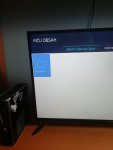
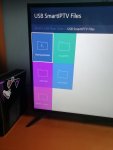
Offline
Hi Husham,Have you checked if the app is installed in the background maybe and already in the apps
Also try not to format using a specific format just use the stanadar fat or the basic quick format
If you did format with something else. Try to go back to fat and transfer files again
I've tried with a normal FAT Format with the March and prior version and extracting in the root of the USB and it just says browse when plugged into the TV.
Is there anything I can work on or build myself to help me upload M3U file up and watch the channels on the TV? I know VLC can view M3U files but there are no ways of putting that player on the TV.
I'm happy to work on developing something if you can lead me to some materials to get me started.
Offline
if you see the browse folder and you placed them on the root. then search the app is installed in your APPs in your samsung and you probably didnt get a message.. Some samsung tvs and some new firmware have now removed the nofication for installing the appsHi Husham,
I've tried with a normal FAT Format with the March and prior version and extracting in the root of the USB and it just says browse when plugged into the TV.
Is there anything I can work on or build myself to help me upload M3U file up and watch the channels on the TV? I know VLC can view M3U files but there are no ways of putting that player on the TV.
I'm happy to work on developing something if you can lead me to some materials to get me started.
otherwise search your TV for other IPTV apps.. See if you find an app called NET IPTV.. see if you can use that instead...
S
sharky
Guest
Offline
It worksCopy the folders to the root not to another folder.
Try again
 and works without USB too.
Thank you very much Husham, you make my day.

Offline
That's what I like to hear. Happy for you buddyIt works
Thank you very much Husham, you make my day.

Offline
Glad it worked man.Hello Husham!
your'e guide worked perfect on my new samsung! thx.
Just got one problem.. when i try to look att a movie (not on a channel) it just say loading and nothing happens..?
any idea?
For new Samsung TVs you might need the medit player changed. Maybe search if your TV has VLC or any player app installed on the TV for playback
Otherwise the most obvious reasons could be that the links you got is not working from the source serves and not your TV
Samsung has recently removed the SMART IPTV and several apps from the Samsung Stores. There was actually no official announcement as to why this is done however further investigation I found out that Samsung is planning to install more Apple TV Casting and Apple TV services and although it is unclear as this is the reason why they removed SMART IPTV from their store, Samsung TV now simple no more SMART then just a TV with Youtube, Netflix and Amazon Prime.
Some Samsung TVs now have it and some dont
Full information how you can get it back are here including download links
https://www.husham.com/warning-samsung-removes-smart-iptv-do-not-rest-your-tv-2/
Video to explain the process in youtube.
hello, I’ve a iPad mini iOS apple can I download usb stick on the to transfer to my Samsung smart tv to get my app back please.
Glad it worked man.
For new Samsung TVs you might need the medit player changed. Maybe search if your TV has VLC or any player app installed on the TV for playback
Otherwise the most obvious reasons could be that the links you got is not working from the source serves and not your TV
Samsung has recently removed the SMART IPTV and several apps from the Samsung Stores. There was actually no official announcement as to why this is done however further investigation I found out that Samsung is planning to install more Apple TV Casting and Apple TV services and although it is unclear as this is the reason why they removed SMART IPTV from their store, Samsung TV now simple no more SMART then just a TV with Youtube, Netflix and Amazon Prime.
Some Samsung TVs now have it and some dont
Full information how you can get it back are here including download links
https://www.husham.com/warning-samsung-removes-smart-iptv-do-not-rest-your-tv-2/
Video to explain the process in youtube.
Offline
On iPad you will need gse app insteadhello, I’ve a iPad mini iOS apple can I download usb stick on the to transfer to my Samsung smart tv to get my app back please.