Thank you!! Have a great night!No slash at the end


SVENORDIUM
Unique IPTV Experience
🛡️ Anti ISP Block
🎧 Friendly Support 🔴 Live Content 🎬 VOD
⚡ Instant Activation
⚡ Instant Activation
🤝 Reselling Available
▶️ Watch Now
Paid advertisement · Svenordium · not affiliated with this forum
You are using an out of date browser. It may not display this or other websites correctly.
You should upgrade or use an alternative browser.
You should upgrade or use an alternative browser.
Game Master IPTV
- Thread starter husham
- Start date
- Status
- Not open for further replies.

Offline
You too!Thank you!! Have a great night!
Offline
Hello, unfortunately I didn’t receive the email. Is it ok to DM it to me please? Thanks!If anyone didn't get the email explaining the server switch earlier today, I can forward it to you
If anyone didn't get the email explaining the server switch earlier today, I can forward it to you
Could you forward it to me, too? Thanks!
Offline
I'd love to see this email. Can you please dm to me? I'd really appreciate it.If anyone didn't get the email explaining the server switch earlier today, I can forward it to you

I need help with xciptv. I have it downloaded and entered the extremely long url and get an error message.ok lets beggin.. who still needs help
link please, thank youAnyone that wants the Discord link. I will only DM it to you .. so leave me a message here for me to DM it to you
Offline
Hi, I have my login info. Would someone please share the server information and url so that I can try to connect via TiviMate? Thanks so much!
Nothing wrong with what you are doing wrong. They are not working and down right now. I had more success accessing stuff with IPTV Extreme than XCIPTV or IPTV Smarters. If you really need service, I would try another provider or wait it out a few days. If you can login, it works well; however, logging in is the issue.
I got XCIPTV installed and logged in with the new URL. The opening screen gave me an "All Streams" box to click, which I did, and now it's been saying that it's "Loading" for quite some time. Is that usual the first time you use XCIPTV, or does it mean that nothing's coming in?
Offline
Any idea on what's going on? Is it going away? Down for maintenance?
Please dm me the new discordPlease DM me the new discod
They are having massing issues right now. It is basically a crapshoot game of logging on the service. I would force stop and clear cache and try again.
Thanks, I'll try that.

Ed209
Staff member
Offline
The server url has been shared a million times. The last time was 8 posts up. Edit your extreme code details with that url with your existing un and pw and good to goHi, I have my login info. Would someone please share the server information and url so that I can try to connect via TiviMate? Thanks so much!
Offline
Thanks. I tried using that but I think I need to have my username/password in the url but I was using the gmaster app before so I’m not familiar with the format. Do you have that available?
Check this message for the email they sent: The Email they Sent
They just removed the new URL: http://server.gmasterpanel.com
However, everything is down right now and the discord disappeared.
Also, some IPTV apps do better than others if trying to access the system. For example, I've had better success with IPTV Extreme over XCIPTV and IPTV Smarters.
Working for me right now using that gmasterpanel URL. Using XCIPTV.
Ed209
Staff member
Offline
Thanks. I tried using that but I think I need to have my username/password in the url but I was using the gmaster app before so I’m not familiar
You go into playlist setting, add playlist, choose extreme codes and enter the url, next spaces below that are for username and password click save it installs hit return and away you go
Offline
I’ll DM youI got XCIPTV installed and logged in with the new URL. The opening screen gave me an "All Streams" box to click, which I did, and now it's been saying that it's "Loading" for quite some time. Is that usual the first time you use XCIPTV, or does it mean that nothing's coming in?
Offline
Hi guys!
Could someone DM me the working URL, or the new (if understood correctly) discord link?
I tried tivimate in firestick, without success.
I'll try to instal xciptv there.
Thanks in advance.
Could someone DM me the working URL, or the new (if understood correctly) discord link?
I tried tivimate in firestick, without success.
I'll try to instal xciptv there.
Thanks in advance.
link pleaselink please, thank you
aint no mo discord..that i know oflink please
Yes please I did not receive anything I would appreciate any help, thank youIf anyone didn't get the email explaining the server switch earlier today, I can forward it to you
Offline
Check this message for the email they sent: The Email they Sent
They just removed the new URL: http://xxxxxx
However, everything is down right now and the discord disappeared.
Thanks!
I read a comment from half an hour ago saying it was working:
Working for me right now using that gmasterpanel URL. Using XCIPTV.
So now I am quite confused.
Last edited by a moderator:
Sorry guys I've had so many people request the email that I'm getting timed out between messages so I will send this out that is global, hopefully people see this
For those requesting the E-Mail:
Dear Valued Member,
Please be sure to "bump" this message if your issues aren't resolved by the time this bot reply has reset all your service accounts. Some service delivery partners are facing network issues while others are offline. Please do not hesitate to cancel your service and/or ask for a refund. If asking for a refund on just the last invoice, please just file a cancellation request with "refund" in the reason box.
** IF YOU ARE HAVING LOGIN ISSUES PLEASE CONFIRM YOUR SERVICE URL, IT HAVE CHANGED : ACCOUNT INFO IS THE SAME. The service provider on the server url is having some capacity problems at present.
The Game Master X app does not work on our service anymore. Please use any app that supports a server URL.
** For those using iPlayTV, Perfect Player, TiviMate or any other app that uses m3u/epg urls, see below: **
Server URL : http://
STB Portal URL : stalker_portal
** IF YOU ARE EXPERIENCING BUFFERING ***
All buffering related issues should be well resolved by now as we've added capacity across our network locations and planned for network usage to not exceed 30% available capacity on average. Our management has changed and stability should have returned to our platform; streams should not buffer from anywhere in North America or Europe presently with better support for Asia and South America coming soon.
** IF YOU HAVE EXTRA / ERRANT INVOICE(s) OR ACTIVE SERVICES **
Instead of opening a ticket to have invoices cancelled, you may open a self-serve cancel request via the "Request Cancellation" button in the service details for the product with any reason and the account plus associated invoices will be cancelled automatically.
If your issues have not been addressed by this bot reply, please post a "bump" and someone will help you promptly.
Thank You for your patience and understanding,
Support Bot
PS: PLEASE NOTE, THIS BOT HAS RESET ALL ACTIVE ASSOCIATED SERVICE ACCOUNTS UPON REPLY.
For those requesting the E-Mail:
Dear Valued Member,
Please be sure to "bump" this message if your issues aren't resolved by the time this bot reply has reset all your service accounts. Some service delivery partners are facing network issues while others are offline. Please do not hesitate to cancel your service and/or ask for a refund. If asking for a refund on just the last invoice, please just file a cancellation request with "refund" in the reason box.
** IF YOU ARE HAVING LOGIN ISSUES PLEASE CONFIRM YOUR SERVICE URL, IT HAVE CHANGED : ACCOUNT INFO IS THE SAME. The service provider on the server url is having some capacity problems at present.
The Game Master X app does not work on our service anymore. Please use any app that supports a server URL.
** For those using iPlayTV, Perfect Player, TiviMate or any other app that uses m3u/epg urls, see below: **
Server URL : http://
STB Portal URL : stalker_portal
** IF YOU ARE EXPERIENCING BUFFERING ***
All buffering related issues should be well resolved by now as we've added capacity across our network locations and planned for network usage to not exceed 30% available capacity on average. Our management has changed and stability should have returned to our platform; streams should not buffer from anywhere in North America or Europe presently with better support for Asia and South America coming soon.
** IF YOU HAVE EXTRA / ERRANT INVOICE(s) OR ACTIVE SERVICES **
Instead of opening a ticket to have invoices cancelled, you may open a self-serve cancel request via the "Request Cancellation" button in the service details for the product with any reason and the account plus associated invoices will be cancelled automatically.
If your issues have not been addressed by this bot reply, please post a "bump" and someone will help you promptly.
Thank You for your patience and understanding,
Support Bot
PS: PLEASE NOTE, THIS BOT HAS RESET ALL ACTIVE ASSOCIATED SERVICE ACCOUNTS UPON REPLY.
@Crystalblue6161
Can you please DM me with the gmaster info
Can you please DM me with the gmaster info
Easiest way to check if your login is working or if the service is online is to use this link with your login in your browser and if it works (with service online) it will just be black text on a white background of all the channel names. If it reports 503 error the service is down right now.
http://xxxxxxxxxxxxx./xmltv.php?username=XXXXX&password=XXXXXX&type=m3u_plus&output=ts
Just replace the XXXXX with your username and the XXXXXX with your password
http://xxxxxxxxxxxxx./xmltv.php?username=XXXXX&password=XXXXXX&type=m3u_plus&output=ts
Just replace the XXXXX with your username and the XXXXXX with your password
Offline
Not many people Kno that trick. I do that's how I'm always able to tell if admin is pulling my chain as they r telling me that they r working and he's watching it on tivimate which i call bullshit
Offline
Easiest way to check if your login is working or if the service is online is to use this link with your login in your browser and if it works (with service online) it will just be black text on a white background of all the channel names. If it reports 503 error the service is down right now.
http://xxxxxxxxxxxxxxx/xmltv.php?username=XXXXX&password=XXXXXX&type=m3u_plus&output=ts
Just replace the XXXXX with your username and the XXXXXX with your password
Just an update, I got it working here on XCIPTV on one device, on MYIPTV Player on PC, and on Smarters on FireStick.
Just FYI, I used the url above on MYIPTV, BUT without the port
 2086). When I tried using it, it failed.
Also on XCIPTV and Smarters, without the port, just the short url provided in the email. (again, when tried with the port, always fails.)
Offline
On your phone open up your browser and try it not on the firestick, if it comes back error 503 then it's not onlineHow do you do this on a firestick?
I don’t quite understand how to get to a url?
Offline
Will do!@Crystalblue6161
Can you please DM me with the gmaster info
Offline
Well I can tell you that I am watching it on XCIPTV app right now..no issues...no lie!Not many people Kno that trick. I do that's how I'm always able to tell if admin is pulling my chain as they r telling me that they r working and he's watching it on tivimate which i call bullshit


Offline
working on XCIPTV here too...i can post screenshots if anyone wants lolWell I can tell you that I am watching it on XCIPTV app right now..no issues...no lie!
Can you DM me the Discord link pleaseAnyone that wants the Discord link. I will only DM it to you .. so leave me a message here for me to DM it to you
Offline
Discord is gone since Sat...that post is very old aboveCan you DM me the Discord link please
After logging in on XCIPTV, does anyone else get a single large button that says "All Streams" instead of the usual "Live TV," etc.? I've installed/uninstalled/reinstalled the app and can sign in just fine, but just this one button comes up. (Clicking on it brings up a "Loading" message, but nothing seems to actually load.) Very weird.
Offline
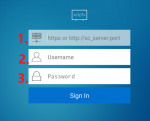
Make sure you use this screen to put the info in...looks like you used the M3U option which will give you the "All Streams" optionAfter logging in on XCIPTV, does anyone else get a single large button that says "All Streams" instead of the usual "Live TV," etc.? I've installed/uninstalled/reinstalled the app and can sign in just fine, but just this one button comes up. (Clicking on it brings up a "Loading" message, but nothing seems to actually load.) Very weird.
Attachments
Offline
I'm wrong i finally got in drop the mpeg from the end jus use ts on tivimate url and you should be in no problemhttp://xxxxxxxxxxx/get.php?username=xxxxx&password=xxxxxx&type=m3u_plus&output=mpegtsThis is what should be entered or am i wrong in tivimate?
Install XCIPTV from the Playstore. Type in the URL that has been listed already (2019 XXX Directory: Sex, Porn & Cam Sites Listing) and your username and password. When you get in if the channels are not loading go to settings, click App, and click Check For Update. Install the update. You should now be good to go.
Pardon my ignorance, but I'm not familiar with the Playstore. I used Downloader to get the app -- would it be different?
Offline
Any one know how I can pay my bill if sites down? Or will my service comtinue until fixed?
Make sure you use this screen to put the info in...looks like you used the M3U option which will give you the "All Streams" option
Ah! I think you've put your finger on the problem. Thank you!
Offline
http://xxxxxxxxxxxxxxxx/get.php?username=xxxxx&password=xxxxx&type=m3u_plus&output=tsI'm wrong i finally got in drop the mpeg from the end jus use ts on tivimate url and you should be in no problem
That's what it should look like jus replace the xxs with your username first then password

Offline
No more discord people@husham is there actually a new discord link? Thanks
- Status
- Not open for further replies.