Paid advertisement – not affiliated with this forum
SVENORDIUM Unique IPTV Experience
🛡️ Anti ISP Block 🎧 Friendly Support  🔴 Live Content  🎬 VOD
⚡ Instant Activation
🤝 Reselling Available ▶️ Watch Now
Paid Advertisement – Not Mine
🎁 Claim Your FREE 24-Hour Trial Now
✈️ Start Free Trial 🌐 Website
Paid Advertisement

Help with Premium account

Offline
Can anyone help me retrieve my account details? or setup details.
I’ve had TiVi premium setup on my 4k fire stick for some time, The fire stick crashed 2 days ago and a new stick purchased and TiVi setup.
I’ve logged in to the account and I think I’ve exceeded the 5 items rule. I need to delete 2 item no longer used and were registered with TiVi.

Can anyone help.

Thanks
You should be able to see registered devices in subscriptions at Google play. If you can't access with a computer or tablet you can by installing tivimate companion
 
You should be able to see registered devices in subscriptions at Google play. If you can't access with a computer or tablet you can by installing tivimate companion
My Google subs show when next payment is due. Payment details made. And cancel sub.
That's it
manage is blank.
 
My Google subs show when next payment is due. Payment details made. And cancel sub.
That's it
manage is blank.
You have to download tivimate companion from Google play
 
The companion tells me to buy the sub.
I've already done that back in June.
In that case your going to have to email the developer at the email address in the listing on Google play. Explain the issue clearly and provide purchase details could you give me the link to the tivimate listing you look at?
 
Did you use the email on Google playstore
 
That may not be the result he gets husham, it's not what I get on samsung tablet, I get a fake tivimate listing. But address for developer is correct on your vid.
Macca if your signing into tivimate companion with the correct credentials it will show registered devices and edit.
 
Oh wow. Didn't know that's even happening
 
That may not be the result he gets husham, it's not what I get on samsung tablet, I get a fake tivimate listing. But address for developer is correct on your vid.
Macca if your signing into tivimate companion with the correct credentials it will show registered devices and edit

That may not be the result he gets husham, it's not what I get on samsung tablet, I get a fake tivimate listing. But address for developer is correct on your vid.
Macca if your signing into tivimate companion with the correct credentials it will show registered devices and edit.
It's telling me the tivimate account is logged in. But asks for a sub and won't go any further.
 
It's telling me the tivimate account is logged in. But asks for a sub and won't go any further.
Is it possible to post a screenshot of tivimate companion? Earlier you mentioned that you emailed a developer and that you were asked to post it here. The developer asked???
 
And locked out the account
And your absolutely positively sure your signing into tivimate and tivimate companion with the same credentials you bought tivimate with? Can you verify that you contacted developer at the address shown in hushams vid? Cuz that screenshot doesn't say you have tivimate installed on anything
 
And your absolutely positively sure your signing into tivimate and tivimate companion with the same credentials you bought tivimate with? Can you verify that you contacted developer at the address shown in hushams vid? Cuz that screenshot doesn't say you have tivimate installed on anything
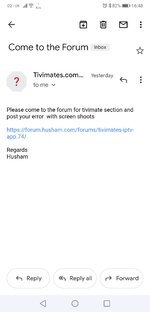
This is the reply from the original email
 

Attachments

  • Screenshot_20220303_164831_com.google.android.gm.jpg
    Screenshot_20220303_164831_com.google.android.gm.jpg
    224.8 KB · Views: 6
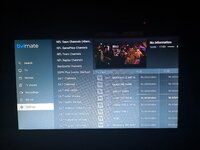
This is a photo just taken off my other firestick with the existing tivimate. I also have another fire stick on the same setup and account
 

Attachments

  • IMG_20220303_165210.jpg
    IMG_20220303_165210.jpg
    2.8 MB · Views: 2
Click the 3 dots in the top right corner of TiviMate Companion and log out. Then log back in again with your Google Play Store email and password.
 
Log out. Clear cache for TiviMate Companion. Restart your device. Then try logging in again.
 
How do I clear the cache?
In your device’s Settings..Your apps..find TiviMate Companion. You will find force stop..clear data..and clear cache. Force stop..Clear the cache.
 
Done all that thanks. Installed my details. Took me back to asking for a sub.
I even deleted the app and reinstalled.
Same thing.
I'll buy another sub with a different email and start again.
 
It sounds like your TiviMate Companion app isn’t communicating with the Google Play Store for some reason. It appears you have tried everything all of us have suggested. You have a whole community of support here. Usually logging out and back in and restarting devices and/or routers solves your issue. The only other thing I can think of is you are signed into another Google account on your device other than your email you use for Google Play Store.
 
That has crossed by mind or when I've changed my last firestick it has not been removed off my account so it's still registered and my replacement has taken me over the limit of devices.
 
That has crossed by mind or when I've changed my last firestick it has not been removed off my account so it's still registered and my replacement has taken me over the limit of devices.
That shouldn’t be the issue as usually it won’t let you add the device if you have already reached your 5 device limit.
 
TiviMate Companion is for purchasing accounts for Fire devices that don’t have access to the Google Play Store. To activate Fire devices..you MUST purchase a subscription thru the Companion app. The Companion app allows you to manage your devices. So if you are looking to activate a Fire device..you will have to purchase a sub thru Companion.
 
Could someone explain what
"purchased for another account"
Means
I've used a different email to set up a 12 sub. Then tells me purchased for another account it doesn't take me to any other page.
If I chose the other sub. It tells me I'm committed to buy if I proceed.
Does anyone know how I set up a 12 sub.
 
I am having an issue after trying to add my fire stick Tivimate is coming up with a error after I put in my credentials to sign into my tivi mate username and pass with the server identification
 
I am having an issue after trying to add my fire stick Tivimate is coming up with a error after I put in my credentials to sign into my tivi mate username and pass with the server identification
I replied to you in your other thread. Drop the /c/ from your server url. That’s for use in a Mag portal. I’m deleting your other thread due to your private info being posted in a pic!! 😳
 
Back
Top