
SVENORDIUM Unique IPTV Experience
🛡️ Anti ISP Block 🎧 Friendly Support  🔴 Live Content  🎬 VOD
⚡ Instant Activation
🤝 Reselling Available ▶️ Watch Now
🎁 Claim Your FREE 24-Hour Trial Now
✈️ Start Free Trial 🌐 Website
Paid Advertisement
MOBUS IPTV — BEST PICK
10k+ Live TV · 11k+ Movies · 6.5k+ Series · PPV (UFC, WWE, Boxing) · 250+ Adult VOD · Firestick & Android · 2 connections
PAY WITH CRYPTO BTC · DOGE · LTC
1M $9  |  3M $25  |  6M $47  |  12M $90
Message to pay →
Paid advertisement

Tivimate does not see my usb drive

Offline
I have a firestick (generation 2) and a sandisk 32GB usb drive (formatted as FAT32) hooked up to it via an OTG cable. When I open the Tivimate app and try to select the drive to record to, the usb drive is not present.
If I exit the Tivimate app, and open the ES file explorer app on the firestick, that app can see the drive no problem. I can create folders on it etc.
Also if I plug the OTG cable and usb drive into my android phone, the phone has no problem recognizing the drive and writing to it. So cable and drive are good.
Anyone got any ideas why the tivimate app will not display the usb drive to select it for recording to ?
Thanks
 
dude i been asking for help on this on my android box no one is helpful here at all tivimate sucks when it comers to recording on curtain drives and devices
 
I have a firestick (generation 2) and a sandisk 32GB usb drive (formatted as FAT32) hooked up to it via an OTG cable. When I open the Tivimate app and try to select the drive to record to, the usb drive is not present.
If I exit the Tivimate app, and open the ES file explorer app on the firestick, that app can see the drive no problem. I can create folders on it etc.
Also if I plug the OTG cable and usb drive into my android phone, the phone has no problem recognizing the drive and writing to it. So cable and drive are good.
Anyone got any ideas why the tivimate app will not display the usb drive to select it for recording to ?
Thanks
 
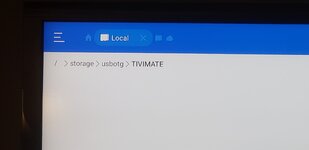
I figured out a way around this problem.
Go to Settings>Other>Recordings>Recordings Folder>Folder Path Threre you can key in the path to your storage device. Mine was /storage/usbotg/TIVIMATE.
You can find your path from a file explore program. I downloaded Es pro from troypoint.

Hope this helps I was pretty frustrated as well.
 

Attachments

  • 20211205_080315.jpg
    20211205_080315.jpg
    1 MB · Views: 10
I have a firestick (generation 2) and a sandisk 32GB usb drive (formatted as FAT32) hooked up to it via an OTG cable. When I open the Tivimate app and try to select the drive to record to, the usb drive is not present.
If I exit the Tivimate app, and open the ES file explorer app on the firestick, that app can see the drive no problem. I can create folders on it etc.
Also if I plug the OTG cable and usb drive into my android phone, the phone has no problem recognizing the drive and writing to it. So cable and drive are good.
Anyone got any ideas why the tivimate app will not display the usb drive to select it for recording to ?
Thanks
you are better off formatting the drive to NTFS as fat32 limits your recordings to only 4gb
 
I have a firestick (generation 2) and a sandisk 32GB usb drive (formatted as FAT32) hooked up to it via an OTG cable. When I open the Tivimate app and try to select the drive to record to, the usb drive is not present.
If I exit the Tivimate app, and open the ES file explorer app on the firestick, that app can see the drive no problem. I can create folders on it etc.
Also if I plug the OTG cable and usb drive into my android phone, the phone has no problem recognizing the drive and writing to it. So cable and drive are good.
Anyone got any ideas why the tivimate app will not display the usb drive to select it for recording to ?
Thanks
I have 3 new 4kMax Firesticks. All but 1 is loaded to my hard drive. The 3rd one will not allow me to launch while connected to external drive. Worked fine before. I think Amazon is doing a great job of limiting what apps we can install
 
Lenny's workaround above is the one that works — TiviMate's folder picker often can't see OTG drives, but typing the path in manually does the trick.

A couple of extra tips: open a file manager like X-plore on the Firestick and check the exact mount path of your drive — it's usually something like /storage/usbotg/ or /storage/xxxx-xxxx/ (the drive's ID). Copy it exactly, then in TiviMate go to Settings > Other > Recordings > Recordings Folder > Folder Path and type or paste that path in.

Also, if your recordings cut off at around 4GB, that's the FAT32 limit — reformatting the drive to NTFS or exFAT sorts that (back up anything on it first).
 
Back
Top