
SVENORDIUM Unique IPTV Experience
🛡️ Anti ISP Block 🎧 Friendly Support  🔴 Live Content  🎬 VOD
⚡ Instant Activation
🤝 Reselling Available ▶️ Watch Now
🎁 Claim Your FREE 24-Hour Trial Now
✈️ Start Free Trial 🌐 Website
Paid Advertisement

Smart IPTV has been removed from most of the OLD Samsung Version

Ok if you download the app
Fo m my website
And put in usb and put the usb in the TV as per instructiona
Then try to locate smart IPTV in the apps section of the Samsung.
Hi Husham
i did everything as you said and still the app doesnt come out

my tv model is UE55MU6179U
 
So what is inside the usb please
 
i downloaded the file from your website,from this website and did everything as you said on the video but still nothing
I understand:) and I'm going under the assumption you did that.
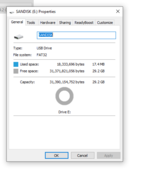
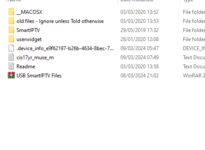
Buy 7 out of ten that contact me did not upload it their usb correctly. I need to know
Can you send me pictures of the usb or something to help me how your usb root is.
 
Which country are you based?
What is your pc
Windows or Mac ?
Are you uploading to the root of the usb?
Which version did you upload to your usb?

And finally if all makes no sense. Maybe best we do a zoom call so I guide you
 
I understand:) and I'm going under the assumption you did that.
Buy 7 out of ten that contact me did not upload it their usb correctly. I need to know
Can you send me pictures of the usb or something to help me how your usb root is.
 

Attachments

  • usb1.png
    usb1.png
    16.7 KB · Views: 3
  • usb2.png
    usb2.png
    14.3 KB · Views: 4
That's what I was worried
Most people using Mac don't extract probably
You need to move the entire contents in the main drive. Not folders. I explained all this in the readme file

Because you used Mac to extract us the issue

The usb will not work
 
Or any. Doesn't matter it will work
 
for Samsung TVs -> after sticking the UBS stick go to Apps and settings -> there you will see the new smartiptv. Put this to the homescreen. Finish :)
 
Please. My Samsung TV model is UN55MU6400.
I already had Smart Iptv installed on it and working perfectly.
But now it no longer loads the channel list.
I uninstalled the TV app.
I downloaded the 2020 Version 2 file – www.husham.com/ss2020v2 and installed it from the pendrive as per your instructions.
But the channel list still doesn't load.
Do I need to download another version??? What do you suggest???
 
Version is ok. Did you upload the list again. Or even try to delete the uploaded list and test the application first without channels
 
I had uploaded the list again.
Now I deleted the list and Smart Iptv loaded it with the demo list.
So I re-uploaded the list.
It keeps those little squares moving and doesn't charge.
Then the screen goes dark, stays like that for a while and returns to normal TV.
Strange, right???
 
So this is normal when your internet provider blocked your IPTV company. It will again after they remove their block

Alternatively add VPN.
 
But I downloaded another app. Smart One Iptv works normally.
It's just that I like the way Smart Iptv works...
If my internet provider had blocked it, Smart One Iptv wouldn't work either, right???
 
Now my list even appears.But when I click on any channel, it leaves Smart Iptv and goes back to normal TV.More and more strange...
 
Have you tried uninstall and turn off TV from power socket for one minute
And then power up
And install again
 
Have you tried uninstall and turn off TV from power socket for one minute
And then power up
And install again
I tried what my friend suggested.
But he didn't work out.
When I delete the list, Smart Iptv comes in.
Then I upload the list again.
The list even appears, but when I click on any channel, the screen goes black and the application exits.
I don't think it will be possible... unfortunately.
 
I tried what my friend suggested.
But he didn't work out.
When I delete the list, Smart Iptv comes in.
Then I upload the list again.
The list even appears, but when I click on any channel, the screen goes black and the application exits.
I don't think it will be possible... unfortunately.
I don't mind doing a video call. Would you like we zoom
 
I'm Brazilian and my English is that of a translator. Sorry.
I wouldn't be able to talk to you on a call.
I understand
I wished to help more. Sorry
 
I understand
I wished to help more. Sorry
Please ...
In Smart Iptv there is an option that I really like. In the settings we can select the Add DVB-T/C/S Channels (TVs only) option.
With this option checked, I can receive local channels as if using the TV antenna.
Do you know of any other Iptv that also has this option???
 
I understand
I wished to help more. Sorry
Please ...
In Smart Iptv there is an option that I really like. In the settings we can select the Add DVB-T/C/S Channels (TVs only) option.
With this option checked, I can receive local channels as if using the TV antenna.
Do you know of any other Iptv that also has this option???
 
Please ...
In Smart Iptv there is an option that I really like. In the settings we can select the Add DVB-T/C/S Channels (TVs only) option.
With this option checked, I can receive local channels as if using the TV antenna.
Do you know of any other Iptv that also has this option???
Try Sparkle TV. It's in the Google Play store. It allows for different sources.
 
Hi there! tryed the pacckage of 2020 if I remember well, new tv just landed on the house and trying to get IPTV on it, but when i plug in the USB I get the security check error and an (-1) ... then i get a new file on the usb that wont allow the download start 2nd time any help?
 

Attachments

  • iptv.webp
    iptv.webp
    59.5 KB · Views: 1
You should extraxt the zip file first in the usb root director
Looking at the image I think you might be using a Mac to extract which causes allot of mistakes
 
Hi there! tryed the pacckage of 2020 if I remember well, new tv just landed on the house and trying to get IPTV on it, but when i plug in the USB I get the security check error and an (-1) ... then i get a new file on the usb that wont allow the download start 2nd time any help?
Could you confirm is your TV a Samsung TV or is it an LG TV or is it some you have like Android TV and you have a fire stick or a Google Chromecast
 
Extracted well, just the security kick in when install want to begin and lock the install.
Samsung TV here, using windows not mac
 
Extracted well, just the security kick in when install want to begin and lock the install.
Samsung TV here, using windows not mac
If you like I can do a WhatsApp video call later to confirm all ok for you
 
Hello everybody ,
I am new on this forum and immediately apologize for any mistake I might do , like a wrong post location..

I had the same problem like most people , I accidently erased Smart IPTV app from my Samsung TV.
Did everything according to Husham recommendations , plug USB stick into TV again , but it
wouldn't install the app. Smart IPTV works fine only when the USB stick is plugged in all the time.
My TV is UE48H6240 , obviously from 2014...
Any help with this ?
Thanks
 
Hello everybody ,
I am new on this forum and immediately apologize for any mistake I might do , like a wrong post location..

I had the same problem like most people , I accidently erased Smart IPTV app from my Samsung TV.
Did everything according to Husham recommendations , plug USB stick into TV again , but it
wouldn't install the app. Smart IPTV works fine only when the USB stick is plugged in all the time.
My TV is UE48H6240 , obviously from 2014...
Any help with this ?
Thanks
Hi mate
The Samsung TV you hav has an older model OS
Unfortunately you have to install and leave usb always connected to get the smart IPTV application working
 
Hello ,

Is there any way to enable the channel that streams live on , let's say , You Tube or Dailymotion , to work
as m3u8 on Smart IPTV without having to change it's link every here and there ?
Does it require a lot of workaround ?
Thanks
 
for smart iptv
you make the m3u and you add the youtube video or daily motion videos
and it will work.. I tried it before
 
You will have to get the YouTube link if any from the source. You can't put that as is
 
Sorry..I am beginner in this stuff....hoped you could do it for me..
This is a stream on Dailymotion...
Get the actual daily motion link
And put in text file
Rename the file to have extension .m3u
And then use that file :)
 
Yea actuall daily motion link
 
And then...what ?
what do you mean by "put in text file" ?
Ok so the link firat
And open a text file in your favourite device
Save the link in it
Customise the file so it reads like m3u.
And then use it in smart IPTV

Link it as per usual.


I know this is complicated and hard to go through.

I'm happy to do a video call with you on what's pr zoom but it will be chargeable at £15 for 15 minutes
 
Ok so the link firat
And open a text file in your favourite device
Save the link in it
Customise the file so it reads like m3u.
And then use it in smart IPTV

Link it as per usual.


I know this is complicated and hard to go through.

I'm happy to do a video call with you on what's pr zoom but it will be chargeable at £15 for 15 minutes
Thanks..but if I understood it right , this is a procedure I knew already..
But the problem is that this kind of links are changing every few hours , and the picture on Smart IPTV disappears..
I was asking if there's a way to overcome this trick...
 
Daily motion
YouTube
And any other source like that will always rotate links for security reasons and for viewable amount and all bunch of reasons.

Only option. Contact the source to give you link directly if you want link that doesn't expire.
 
Daily motion
YouTube
And any other source like that will always rotate links for security reasons and for viewable amount and all bunch of reasons.

Only option. Contact the source to give you link directly if you want link that doesn't expire.
Thank you for advice..
I will do it , but I very much doubt they would do this favor..
 
Thank you for advice..
I will do it , but I very much doubt they would do this favor..
80% sure they won't share.
They put it in daily motion to avoid traffic problems and let daily motion deal with traffic problems
 
Back
Top