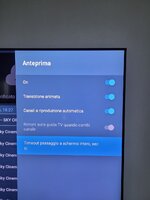
In Tivimate there is an option that when I change channel, in the channel list, it immediately changes the video without having to push OK ?
I try many setting but i dont find this option or is not present ?
As far as I know, the best thing you can do is to have the preview screen active/live when changing channels and then have your settings to 30 seconds and the picture will go full screen. It would be nice if it were shorter, but 30 seconds is the lowest option.
Appearance:
TVguide:
a. Preview - (This affects both the full guide and side guide)
1. On - Gives preview window
2. Animated transition (If on)
3. Autoplay Channels - If on plays channel highlighted without selecting.
4. Stay on TV Guide - If on requires second click to bring channel full screen.
This site uses cookies to help personalise content, tailor your experience and to keep you logged in if you register.
By continuing to use this site, you are consenting to our use of cookies.