
⭐ Upgrade your streaming experience
The new Husham Stick. Faster. Cleaner. No nonsense.
Get the Husham Stick Now

Paid Advertisement
You are using an out of date browser. It may not display this or other websites correctly.
You should upgrade or use an alternative browser.
You should upgrade or use an alternative browser.
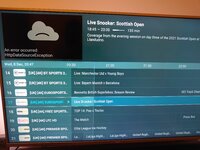
An error occured HttpDataSourceException
- Thread starter Zak
- Start date

Ed209
Staff member
Offline
Is that on all chanells? Try 7sing a VPN firstHello,
Since the new update on my Firestick I am having problem connecting. I have done the following:
1) Restarted my router
2) Restarted the wireless
3) Restarted the Firestick
4) Reinstalled TiviMate app
This randomly happens when I am using the IPTV.
Please advise.
Kind regardsView attachment 799
Offline
Only can be three things
1= stream was cut off from your provider.
2=isp is blocking access
3=provider changed url
Most likely #2
Ways to fix
Contact provider
Use vpn (paid) not free
Unplug router for a few minutes
restart device
look up tivimate on reddit and ask for help, they are very helpful.
1= stream was cut off from your provider.
2=isp is blocking access
3=provider changed url
Most likely #2
Ways to fix
Contact provider
Use vpn (paid) not free
Unplug router for a few minutes
restart device
look up tivimate on reddit and ask for help, they are very helpful.
Offline
Long-press a channel in the guide and select "Open in external player" (like VLC or MX Player). If it plays there, the issue is purely with TiviMate's internal player settings.Hello,
Since the new update on my Firestick I am having problem connecting. I have done the following:
1) Restarted my router
2) Restarted the wireless
3) Restarted the Firestick
4) Reinstalled TiviMate app
This randomly happens when I am using the IPTV.
Please advise.
uno online
Kind regardsView attachment 799