
Paid advertisement – not affiliated with this forum

SVENORDIUM
Unique IPTV Experience
🛡️ Anti ISP Block
🎧 Friendly Support 🔴 Live Content 🎬 VOD
⚡ Instant Activation
🤝 Reselling Available
▶️ Watch Now
Paid Advertisement – Not Mine
You are using an out of date browser. It may not display this or other websites correctly.
You should upgrade or use an alternative browser.
Hello guys. If I change the android box, how can I transfer my tivimate subscription to the new box?
- Thread starter JerGisi
- Start date

Offline
Thanks but I don’t have 5 devices subscription for tivimate . I payed only for one device. Thanks again for info.. I just remove old device from tivimate companion . ThanksYour allowed 5 devices with your subscription. Simply download and install tivimate on the hew box. You can download tivimate companion app to your phone or tablet and use it to remove your old box if you wish.


Ed209
Staff member
Offline
Glad to help, I hope you can explain to me what you mean by buying a one device subscription though. As far as anybody knows there is just the five device sub. You can verify with the companion app will show list of devices and available slots.Thanks but I don’t have 5 devices subscription for tivimate . I payed only for one device. Thanks again for info.. I just remove old device from tivimate companion . Thanks
Offline
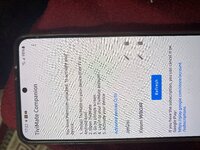
I paid for one year not for lifetime is only for one device.Glad to help, I hope you can explain to me what you mean by buying a one device subscription though. As far as anybody knows there is just the five device sub. You can verify with the companion app will show list of devices and available slots.
Attachments

Offline
Woooooow is amazing is for 5 devices thanksI paid for one year not for lifetime is only for one device.

Attachments
Ed209
Staff member
Offline
Yes it's a good deal untill you need 6 devices lolWoooooow is amazing is for 5 devices thanks
Offline

Offline
Just install tivimate companion from android device then login your account you can see login devices on your account. Needs smartphone not TV .I installed tv mate companion in my phone and don't see any place where there are my 5 devices and can be added or deleted or replaced.
Offline
You can delete all devices then login again your devices ( i recommended to change password after removed all devices from tivimate companion) then login again your devices. ( sorry for my bad EnglishThanks i did install tivimate on my wife's phone and i can see 5 devices .but they not named corrected ,i did correct their name , but i don't think that will solve my lock out issue?
)
Offline
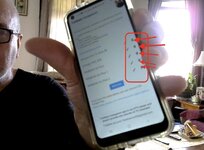
Nope just remove your devices from here then change your account password ( on I don’t remember password) then login again in your android box.Thanks mate; you mean delete all in phone tivimate companion app ? and clear data on the devices and log in tivimate again in each individual device?
Attachments
Offline