Paid advertisement – not affiliated with this forum
SVENORDIUM Unique IPTV Experience
🛡️ Anti ISP Block 🎧 Friendly Support  🔴 Live Content  🎬 VOD
⚡ Instant Activation
🤝 Reselling Available ▶️ Watch Now
Paid Advertisement – Not Mine
🎁 Claim Your FREE 24-Hour Trial Now
✈️ Start Free Trial 🌐 Website
Paid Advertisement

C'ant record whithh tivimate

Offline
Hi am new here, so i hope i post at the right place ...
I got a problem. I cant record anything more than 15 seconds whit my tivimate app premium. My android box is a bran new macool km6, so there must be no problems whith the space ...and my iptv provider allowed multiple connections .I tried everything even changing from mac to Xtreamcodes...ty for helping me here :)
 
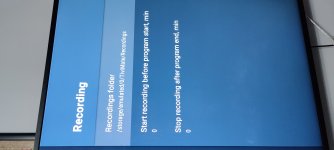
You need to go to settings-other-recordings, and make sure the recordings folder says something like /storage/emulated/0/TiviMate/Recordings.
 
You need to go to settings-other-recordings, and make sure the recordings folder says something like /storage/emulated/0/TiviMate/Recordings.
It s exactly what i have but ty . I dont known what is wrong. I tried all setting possible, making sure my epg was up to date ...nothing works :rolleyes:
 
It s exactly what i have but ty . I dont known what is wrong. I tried all setting possible, making sure my epg was up to date ...nothing works :rolleyes:
where exactly do you have tivimate pointed to record, what is the path and is it a networked harddrive or usb device?
 
/storage/emulated/0/TiviMate/Recordings. not on a usb.my box is new and empty
so this is the path to save the recording internally in the android box? Can you follow the path using file explorer and see the actual folder 'recordings'?
 
so this is the path to save the recording internally in the android box? Can you follow the path using file explorer and see the actual folder 'recordings'?
Yes its the right path and all my recorded show in there...its the time that is not good.Even in manual. I only can record for 15 second and it stopped ? And my EPG is up to date
 
nobody has an answer to recording with tivimate, mine worked allways and for the past couple months same thing as you 5 seconds then stop. Some day its when there is buffer but thats not the issue. They also say some providers dont allow but i have 4 and none of the them??? nah thats not it. They always say recording iptv is unreliable and thats the only reliable answer. 24/7 and vod has everything amyway
 
tivimate records fine on my box.. ( not to brag ) but managed to record the channels cnn for 45 minutes as I was watching something special at the time and wanted to show my dad.
I recorded with tivimate.. and we played back all great

I had a prmieum Tivimate - and was using the Husham 2.0 BOX.
Storage was local storage
the box was using Android 10
what is the path to your recorings folder, because my recording stoped on my stick ans android box.
 
what is the path to your recorings folder, because my recording stoped on my stick ans android box.
I will check for you
 
16234476683166098943218057065605.jpg

As you see I'm only using the standard one or default one. I'm using husham TV box 2.0
Memory storage not much but works for 1 hour recording
 
as you can see alex it works for some (HIM) and not for others you,and me and counless others lol
 
Works fine for me as well, same setup as husham but different box. Could it have any thing to do with time off set?
 
I haven't
Works fine for me as well, same setup as husham but different box. Could it have any thing to do with time off set?
tried recording using the start time/end time function on my box but interesting comment. but so far it doesnt work when scheduled from the epg nor instant recording of remainder of program.
 
to ed209 ...after my provider assure me that i can record like if i had mutiple connections i tried to record from the tv guide (whit a black screen,no channel on to see ) and it worked ! So for me it means that my provider was lying...u needed more than just 1 connection...
 
to ed209 ...after my provider assure me that i can record like if i had mutiple connections i tried to record from the tv guide (whit a black screen,no channel on to see ) and it worked ! So for me it means that my provider was lying...u needed more than just 1 connection...
oh yes you need two connections for sure no matter the provider. good tip though will try without screening anything, just epg. might be usefull on ovenite stuff i guess.
 
oh yes you need two connections for sure no matter the provider. good tip though will try without screening anything, just epg. might be usefull on ovenite stuff i guess.
give me news if it works for you...yes i knew it took 2 connection but after i talked whit my providers he said that i didnt needed 2 ....o well :rolleyes::unsure:
 
I mainly use a firestick so internal storage is a non starter but now its recording fine to a networked computer. I changed the computer's ip to static on the modem as it changed once in a while when i unplug the modem for maintenance. That led me to believe tivimate wasnt working.
 
I mainly use a firestick so internal storage is a non starter but now its recording fine to a networked computer. I changed the computer's ip to static on the modem as it changed once in a while when i unplug the modem for maintenance. That led me to believe tivimate wasnt working.
Hi so was it working recording whit the epg on a blank screen ?
 
its
Hi so was it working recording whit the epg on a blank screen ?
working every which way, it was the ip address setting change to dynamic that was the problem he re. My recording folder is on a windows 10 computer thsts networked
 
Back
Top