Paid advertisement – not affiliated with this forum

SVENORDIUM
Unique IPTV Experience
🛡️ Anti ISP Block
🎧 Friendly Support 🔴 Live Content 🎬 VOD
⚡ Instant Activation
⚡ Instant Activation
🤝 Reselling Available
▶️ Watch Now
Paid Advertisement – Not Mine
You are using an out of date browser. It may not display this or other websites correctly.
You should upgrade or use an alternative browser.
You should upgrade or use an alternative browser.
Catch Up
- Thread starter geez
- Start date
I can see all the catch-up channels, I can scroll back through the EPG and see what was on. None of channels I've tested allow me to watch anything on catch up. I either get a black screen or error message on all channels when I click to watch.What part from the catch-up not working for you.
Thank youI have reported this for you to our team
Although I don't watch catch-ups / time shifts I decided to try it myself as well. Unfortunately experiencing the same issue as geez reports. I tried this on Discovery Family, Fox Sports 1, and FYI and all circle until the error message pops up. I use an Android-based box and the same channels work fine watching the live feeds.

Oddballs
Staff member
Offline


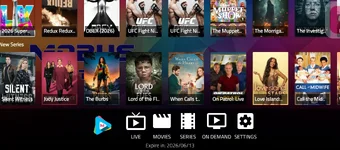
Attachments

Oddballs
Staff member
Offline
Hi there,
Catch-Up is working on the service
The clock icon shows up in the EPG on channels that actually support Catch-Up. You can go back to previous days and play shows with rewind and timeline controls. That only works when Catch-Up is enabled on the provider’s end and hooked up properly to the EPG.
If you’re not seeing the clock on certain channels, that usually just means those channels don’t offer Catch-Up. Totally normal. Not a TiviMate issue and not a device problem.
To sum it up
nothing’s broken.
Catch-Up is there where it’s supported
Catch-Up is working on the service
The clock icon shows up in the EPG on channels that actually support Catch-Up. You can go back to previous days and play shows with rewind and timeline controls. That only works when Catch-Up is enabled on the provider’s end and hooked up properly to the EPG.
If you’re not seeing the clock on certain channels, that usually just means those channels don’t offer Catch-Up. Totally normal. Not a TiviMate issue and not a device problem.
To sum it up
nothing’s broken.
Catch-Up is there where it’s supported

Offline
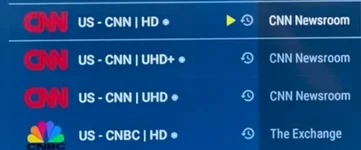
Yes, I understand, however, I fail to understand (again focusing on TiviMate, which is all I want to use) why on Mobus I see NO clocks, whereas on TiviMate with several other playlists, there are clocks for CatchUp - Settings are the same.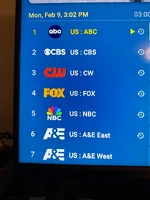
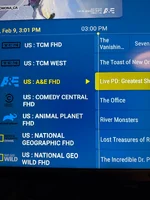
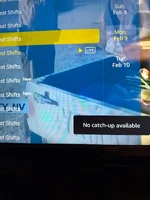
Attached, you will see on the left a random snapshot of one of several of my playlists that all have catch-up clocks. The snapshot on the right is Mobus showing none where some channels should have them. So on my TiviMate, I have numerous playlists that properly display catch-up, all including Mobus have the same playlist/catch-up settings, but seemingly no rewind/catch-up on yours. I cannot explain this.
Attached, you will see on the left a random snapshot of one of several of my playlists that all have catch-up clocks. The snapshot on the right is Mobus showing none where some channels should have them. So on my TiviMate, I have numerous playlists that properly display catch-up, all including Mobus have the same playlist/catch-up settings, but seemingly no rewind/catch-up on yours. I cannot explain this.
Last edited:
Oddballs
Staff member
Offline
Hi there
I get what you’re saying.
The difference you’re seeing isn’t really TiviMate vs Mobus, it’s how each app chooses to display Catch-Up info. Some apps show the clock icon everywhere it’s available, others are more selective or only show it once you’re inside the EPG or playback.
The key part is this: if you can scroll back by date and play past programs with rewind, Catch-Up is active, even if the clock icon isn’t always visible in the channel list.
So it’s more of a UI/display thing than Catch-Up being off. Service side is working, it just presents a bit differently depending on the app.3
I get what you’re saying.
The difference you’re seeing isn’t really TiviMate vs Mobus, it’s how each app chooses to display Catch-Up info. Some apps show the clock icon everywhere it’s available, others are more selective or only show it once you’re inside the EPG or playback.
The key part is this: if you can scroll back by date and play past programs with rewind, Catch-Up is active, even if the clock icon isn’t always visible in the channel list.
So it’s more of a UI/display thing than Catch-Up being off. Service side is working, it just presents a bit differently depending on the app.3
Offline
Yes,. what is of course more strange is that we have the same situation on every device w/TiviMate. I wish some others would comment on the situation. I certainly can't explain it.Thats actually Very strange
Have you tried reinstalling
Oddballs
Staff member
Offline
Sorry. I meant I know it's a long shot. But try VPN pleaseYes,. what is of course more strange is that we have the same situation on every device w/TiviMate. I wish some others would comment on the situation. I certainly can't explain it.
Offline
Sorry. I meant I know it's a long shot. But try VPN please
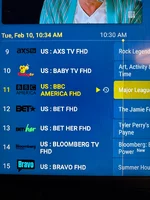
So here's the situation:
1. Two different cities
2. Three different service providers
3. Five different devices
4. VPN On and Off
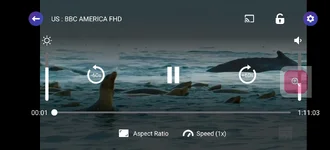
5. The ONLY station that indicates Catch-up is US: BBC AMERICA FHD, as shown in the attached snapshot.
I'm not one to believe in coincidences, but to me, this adds up to some Mobus issue if, with all of this, I can catch up on several other playlists.
Thank you.
Offline
No, it's the current final version, which has probably been around for a year now. IMO TiviMate is the only app worth using; anything else is just second-rate. As mentioned earlier. I have one channel with theIt is possible that you might hav new version of tivimate and having issu s with naming conventions.
IThis need to be looked at further.
If it's working in IPTV smarters for you. Use that for now please
 symbol. No clock, no catch-up. Oddly, this was not the case previously with Mobus. The problem was, of course, that for a time it just didn't work at all. So now you say it works, but there's no which means to me that it doesn't work because it can't. Unfortunately, no one else cares to comment on the subject, so there isn't much I can do about it.
Offline
Sorry, but I would like to hear from other subscribers of Mobus who use TiviMate, as I personally have had information from subscribers in other states with a variety of providers, with/without VPN, who also have the same experience as I do, which essentially means no catch-up except for one channel. There's clearly something inconsistent here, but if people aren't bothering to be responsive to this issue or just don't care, there's little I can do about it.No, it's the current final version, which has probably been around for a year now. IMO TiviMate is the only app worth using; anything else is just second-rate. As mentioned earlier. I have one channel with the
Offline
Sorry, but I would like to hear from other subscribers of Mobus who use TiviMate, as I personally have had information from subscribers in other states with a variety of providers, with/without VPN, who also have the same experience as I do, which essentially means no catch-up except for one channel. There's clearly something inconsistent here, but if people aren't bothering to be responsive to this issue or just don't care, there's little I can do about it.
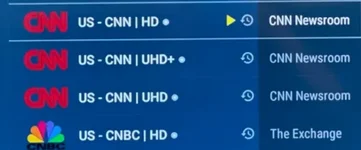
Elsewhere ... but not on Mobus...reported to me by people in several states, different providers, w/and without VPN, different apps. Anyone?